
DxDozer Working Together with WSJT-X
A logbook that talks to WSJT-X saves a lot of typing and helps you spot the stations you still need. This page shows how the DxDozer logbook works alongside WSJT-X during FT8 operation.
Cooperation
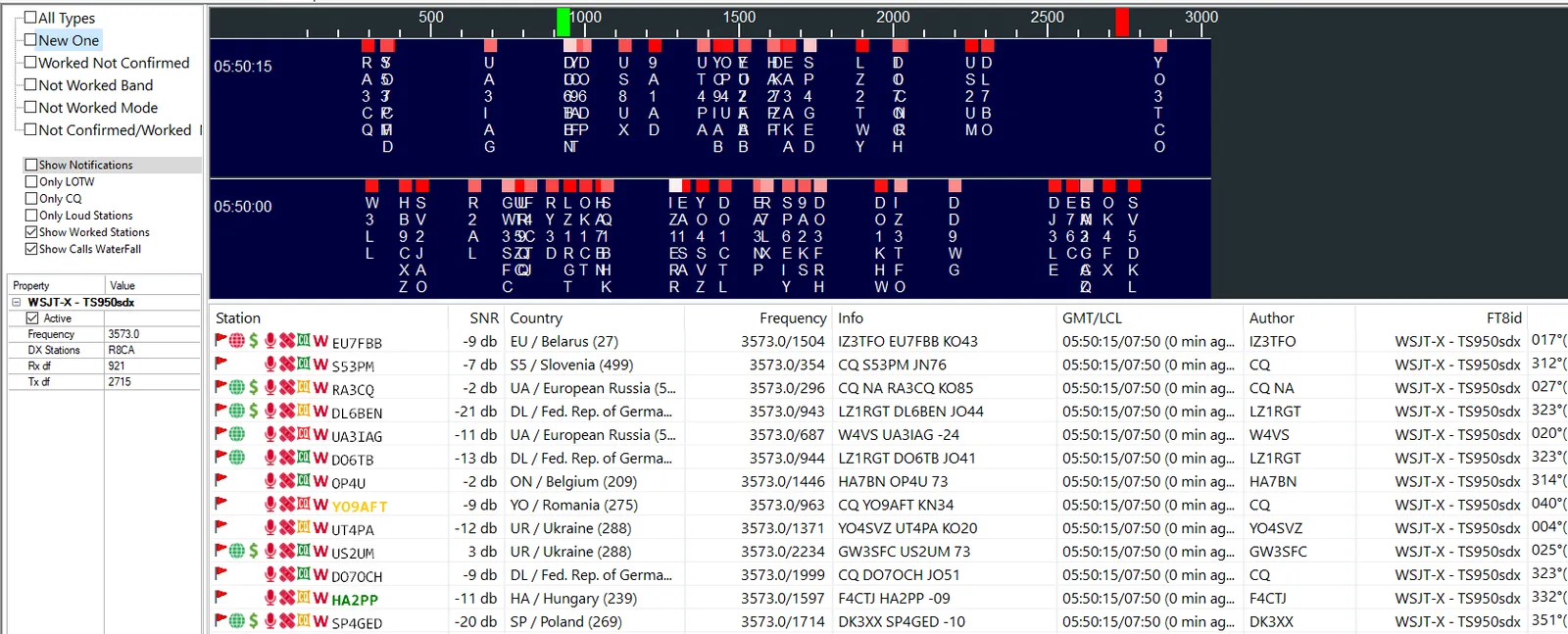
WSJT-X can work together with other programs. DxDozer uses this to log every completed QSO automatically in the logbook. The communication goes both ways, so DxDozer can, in a way, remote-control WSJT-X. The most important part, however, is its special FT8 screen. This screen is divided into three parts. The left part holds the display options for the stations WSJT-X has heard. The right part shows the list of stations in two ways: graphically on the spectrum and as a list.
Station Spectrum
Here we see the traces of the stations in our receive passband with their callsigns, and the strength of each signal as a shade of red: red for the strongest and almost white for the weakest. Above the spectrum, green marks where we receive and red where we transmit in the passband.
Station Filters
At the bottom we see which WSJT-X DxDozer is connected to. Here I have two WSJT-X instances on two different transceivers. The one checked as "Active" is the one we see on the spectrum, but in the list we see stations from both.
At the top we have the choice of filters. This choice affects only the station list and not the spectrum. If we check "Show Notifications", then every time a station appears in the list we get a visual and a sound alert. If, for example, you only hunt new DXCC entities, it alerts you when one appears.
Station List
The station list holds a lot of information:
- The colour of the flag shows details about the DXCC entity.
- A green globe next to it shows that the station uploads to LoTW regularly.
- A dollar sign shows that the station offers OQRS, and so on.
- The tooltip, when you rest the cursor on a station, shows more information.
- A double-click opens a context menu with even more options, for example to look the station up on QRZ or to see on which bands and modes we have worked that DXCC entity.
And for the older among us, you can enlarge the font so you don't need glasses!
Finally, if you double-click a station, WSJT-X starts calling it, which means it switches to transmit.
Questions and Answers
Do I still need to log contacts by hand?
No. Every completed QSO in WSJT-X is passed to the logbook automatically.
Can it follow more than one radio?
Yes. It can be connected to several WSJT-X instances at once; the active one is shown on the spectrum, while the list shows stations from all of them.